 Als Preview
Reference
Your data and disk space
Als Preview reads your sets and never changes them. What it keeps of its own stays on your Mac, in three places, one of them for the Remote Script, and Settings › Storage shows how much.
Your sets
Als Preview only reads your Live Sets. It doesn’t save into them, rename them or move them. Status, notes, favorites and collections live in Als Preview’s library, not in your sets.
The only thing that goes into a set is the plugin’s ID, saved by Live itself as part of the plugin’s settings when you save the set. The Remote Script doesn’t save into your sets either.
What Als Preview keeps, and where
| What | Where |
|---|---|
| Recordings | The shared folder of the app, its plugin and Quick Look: ~/Library/Group Containers/7Q88FGB2TN.de.marvinvogel.ableton-preview/Recordings. One folder per set ID; each take is an .m4a file and a small .json file. |
| Approximate previews | The same shared folder: Previews. Each preview is an .m4a file and a small .json file. See Approximate previews. |
| Time tracking, exports | The same shared folder: Activity and Exports. |
| The Remote Script’s time | While Live has a set open: the Sessions folder next to the script, Remote Scripts/AlsPreview/Sessions in Live’s User Library, one .json file per time a set is open. Once Live has closed the set, Als Preview moves its file into the shared folder: Activity/Live. |
| What the plugin window shows | The same shared folder: Overview. |
| Library index | What Als Preview read from your sets, and your statuses, notes and collections. In the same shared folder. |
| Status changes | In Als Preview’s own container, not the shared folder: ~/Library/Containers/de.marvinvogel.ableton-preview/Data/Library/Application Support/Momentum/Status Changes.json. For each time a project’s status changed: the project, the old and the new status, and when. Momentum uses it for the status moves and its Finish, Advance and Polish goals. See Momentum. |
| Momentum milestones | Next to the status changes: …/Application Support/Momentum/Milestones.json. The day each project’s arrangement grew from a loop to song length, and the days projects were picked up again after a month or more, for Momentum’s Lay Out and Revisit goals. See Momentum. |
| Waveform cache | The same shared folder, so Quick Look draws waveforms too: Library/Caches/Waveforms. Made again when needed. |
| Settings | Your folders, layouts and choices, your views, the sidebar’s sections and the names, icons and order of your statuses, in Als Preview’s preferences; which status each project has stays in the library index. |
To open the recordings folder, Control-click a recording in Settings › Storage and choose Show in Finder.
How much space recordings take
The plugin saves compressed audio (AAC, 96 kbit/s per channel): about 85 MB for every hour a set plays in Live. Only what you can still hear is kept: when you play a part again, takes the new one covers completely are deleted right away.
Because you play the same bars again and again, a song keeps far less than the hours you spent on it: at most about one take’s worth of each part of the song, per version. Settings › Storage lists every set’s recording by size.
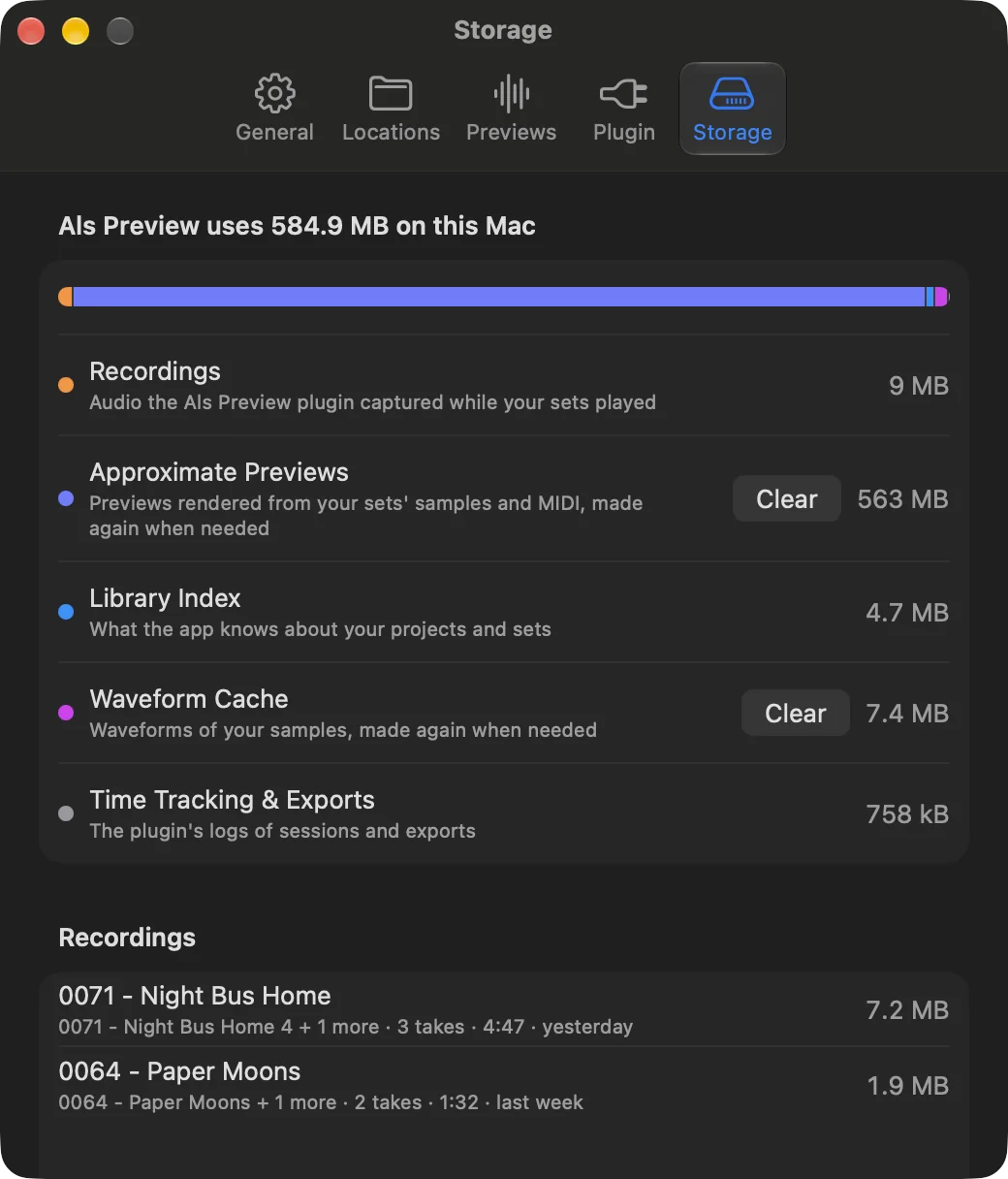
To free space, delete the recordings you don’t need there. Deleted takes can’t be restored, and the set records again the next time it plays.
Approximate previews take about 70 MB per hour of music, and Als Preview keeps at most 2 GB of them. Clear next to Approximate Previews in the same tab deletes them; they’re rendered again when needed.
What’s cleaned up by itself
- Takes that newer takes cover completely, in every version of the set they belong to.
- Takes shorter than half a second (a tap on Play and Stop).
- Audio left over when Live quit in the middle of a take, after an hour.
- Time-tracking sessions shorter than a minute without playback. The Remote Script also leaves out sets that were never saved.
- The Remote Script’s files of sets Live has closed, which Als Preview moves into its shared folder, so the script’s folder stays small. A set Live never closed, because it stopped unexpectedly, follows after two days.
- Approximate previews beyond 2 GB, the ones shown least recently first, and audio of a render that didn’t finish, after an hour.
Recordings of sets you deleted aren’t removed by themselves: they show as Not in Library in Settings › Storage, where Select Recordings Not in Library picks them all.
Privacy
- Nothing you record, render, track or note leaves your Mac. Als Preview has no account, and the app itself sends nothing to us.
- The plugin talks only to the Remote Script, on your Mac.
- The Remote Script writes your time to files on your Mac, and Als Preview reads them there.
- The App Store handles the purchase; Als Preview only learns whether you own it.
- Crash reports reach us only through Apple, and only if you allowed sharing with app developers in macOS.
Details in the app privacy policy.
A new Mac, or starting over
- Your purchase comes with your Apple Account: on another Mac, click Restore Purchases. See Free trial and purchase.
- Recordings and time follow your sets, because the sets carry the plugin’s ID. Migration Assistant brings the shared folder above along; otherwise copy it to the same place on the new Mac before opening Als Preview there. The Remote Script’s time goes by where your sets are, so keep your projects at the same place, and install the script from Als Preview again on the new Mac.
- The library builds itself again from your folders; statuses, notes and collections are part of the library index in the shared folder.
- Removing Als Preview: delete the app, then the folder
~/Library/Group Containers/7Q88FGB2TN.de.marvinvogel.ableton-previewif you don’t want to keep recordings and time, and theAlsPreviewfolder inRemote Scriptsof your User Library if you installed the Remote Script.