 Als Preview
Preview and listen
Approximate previews
The plugin can only record what plays in Live. For the bars it hasn’t heard, Als Preview renders a preview from the set itself: its audio clips, frozen tracks and sampled instruments, through its mixer. So a set you made before you had the plugin plays too.
The short version
- When a set is shown and has no preview yet, Als Preview renders one in the background. Live doesn’t open and no plug-in loads.
- The preview plays in blue in the Recording lane, wherever the plugin hasn’t recorded the set. The plugin’s takes stay green and always win: a recording is the real sound.
- A preview is an approximation. It has the set’s volume, pan and automation, and Live’s reverbs and delays on return tracks, but no other effects, and plug-in instruments play as a simple stand-in synth.
- Everything is rendered on your Mac. Previews take about 70 MB per hour of music, and Als Preview keeps up to 2 GB of them.
Takes always win
- The preview’s pieces are blue and labelled “Approximate”. Takes keep their green, paler when older, and their age.
- Wherever a take covers a bar, the take plays, however old it is and however new the preview.
- A set without takes shows the lane as Preview, with how long ago it was rendered, and its play button turns blue.
- Previews are all brought to the same loudness, so they don’t tell you how loud a mix is. Between takes, a preview plays about as loud as they do, so you don’t hear a jump where one hands over to the other.
- Hold the pointer over the lane’s header to see what the preview is made of and what it left out, like “Serum played by a simple stand-in synth” or “2 samples from Live Packs only Live can play”.
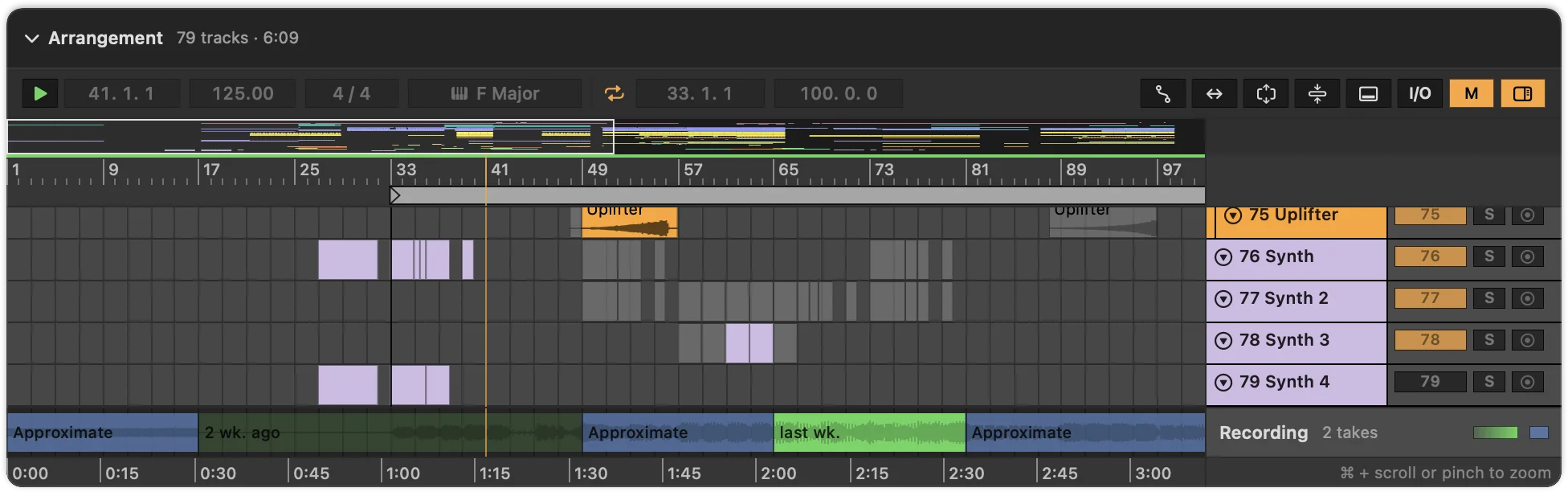
Playing works as with takes: click a bar and press Space. See Listening to a set.
When a set is rendered
- When it’s shown
- Select a set, or a save in the History, and if it has no preview yet, rendering starts. Until it’s done, the Recording lane shows how far it got: Rendering a preview from the set… 40 %. The set you’re looking at goes ahead of every other set waiting.
- In advance
- While Als Preview is open, it renders the main set of the 150 projects you changed last, one at a time and at low priority. It pauses while your Mac is in Low Power Mode or running hot.
- Pausing
- While previews render, the toolbar shows a progress bar with a pause button beside it, also in the details you get by clicking the bar. Pause, for example while you work in Live, and the render under way holds where it is and no other starts; the lane says Rendering paused at 40 %. Click the play button to go on from there. Rendering also goes on by itself the next time Als Preview opens.
- Once for each save
- A preview belongs to one saved state of a set. Save the set in Live, and the next time it’s shown, it’s rendered again. When Live moves the earlier save into the Backup folder, its preview goes with it, so older versions in the History keep sounding as they did.
Quick Look in Finder plays the previews Als Preview has rendered, but doesn’t render any itself. With rendering in advance turned on, your recent sets are ready there.
If a set can’t be rendered, the lane says why, for example that some samples are in folders Als Preview may not read. See Troubleshooting.
What a preview plays
- Audio clips
- From their samples, where they sit in the arrangement, with clip gain, fades, transposition and warping. Clips in Beats mode are played in slices and Re-Pitch clips change pitch with speed; the other warp modes use a general time-stretch, so strongly stretched audio can sound a little different from Live.
- Frozen tracks
- From the freeze files Live wrote, so they sound as they do in Live, instruments and effects included.
- Simpler, Sampler and Drum Racks
- Also inside Instrument Racks, they play the MIDI clips with their own samples: key and velocity zones, envelopes, filters and choke groups included.
- The mixer
- Each track’s volume, pan, on/off switch and sends, its groups and the Main track’s volume, with their automation. Utility’s gain and mute count too.
- Reverbs and delays on return tracks
- Live’s Reverb, Hybrid Reverb, Delay and Echo, and the older Simple Delay, Ping Pong Delay and Filter Delay, approximated from their main settings, like decay and pre-delay, or delay time and feedback. They come close, not exact.
What a preview leaves out
- Effects. Apart from those reverbs and delays on return tracks, no effect is rendered: no EQ, compressor, saturation or filter, Live’s or a plug-in, on any track, group or the Main track. A mix that depends on its effects sounds drier and plainer.
- Other instruments. Plug-in and Max for Live instruments, and Live’s instruments other than Simpler, Sampler and Drum Racks (Operator, Wavetable, Drift, Electric and the like), play as a simple stand-in synth: the notes and the rhythm are right, the sound isn’t. Turn the stand-in off in Settings, and those tracks stay silent instead.
- MIDI effects like Arpeggiator, Chord or Scale: the notes play as they are in the clips.
- Samples it can’t read. Live’s Packs keep their samples in a protected format only Live can play, also after Collect All and Save copied them into a project. Samples from Live’s Core Library do play, from the Live installed on your Mac. Other samples may be missing, or in folders Als Preview may not read; add those in Settings › Locations › Sample Folders. Drum Rack pads that use such samples play stand-in drums and melodic Simplers and Samplers a stand-in keys sound; other one-shots and audio clips stay silent.
- Session View. Only the arrangement is rendered. A set whose music is all in Session View clips gets no preview.
- Long sets. A preview stops after 20 minutes, counted from the first clip.
Closer to the real sound
- Play the set once with the plugin. A take is the real sound and replaces the preview wherever you played. One pass through the song, and the lane is all takes.
- Freeze tracks with plug-in instruments, or with effects that matter, before you save. Frozen tracks play from their freeze files, so they sound right in the preview.
- Add your sample folders in Settings › Locations, so Als Preview can read the samples your sets use.
Settings and storage
Three switches in Settings › Previews turn rendering off, leave out the stand-in synth, or keep Als Preview from rendering sets in advance. See Settings.
Previews are kept in Als Preview’s shared folder, next to the recordings, so Quick Look can play them too:
~/Library/Group Containers/7Q88FGB2TN.de.marvinvogel.ableton-preview/Previews/
- Each preview is an
.m4afile (AAC at 160 kbit/s) and a small.jsonfile: about 70 MB per hour of music, or 5 MB for a four-minute song. - Als Preview keeps up to 2 GB of previews. Beyond that, the ones shown least recently are deleted; they’re rendered again when needed.
- Settings › Storage shows how much space they take. Clear next to Approximate Previews deletes them all; sets are rendered again when they’re shown.
- Rendering happens on your Mac, and nothing is uploaded.
More on Your data and disk space.