 Als Preview
Guides
What is an .als file?
An .als file is an Ableton Live Set: the file Ableton Live saves a song in. Here is what’s in it and what isn’t, how to open one, and how to look inside without opening Live.
What’s in a Live Set
ALS is short for Ableton Live Set. Live writes one when you choose File › Save Live Set, and its templates are .als files too. A set holds everything about a song except the audio:
- its tracks, groups and return tracks, with their names and colors,
- the clips in the Arrangement and in the Session View, and where they sit,
- every note of its MIDI clips,
- Live’s devices and your plug-ins, with all their settings,
- the mixer, the automation, the tempo, the time signature and the locators.
What isn’t in it
The audio. An audio clip only points at a file: a sample you dragged in, or a recording Live made. These files lie next to the set, usually in the Samples folder of its project, or anywhere else on your disk. That’s why an .als file is small, and why a set you’re sent on its own opens with silent clips: Live reports its media files as missing.
The plug-ins. The set stores which plug-in sits on a track and how it was set, not the plug-in itself. It has to be installed on the computer that opens the set.
To pass a set on, choose File › Collect All and Save first, which copies the samples it uses into its project folder. Then send the whole folder.
Sets, projects and backups
Live keeps a set in a project folder, named like the set with “Project” at the end. Next to the set, it holds the project’s samples, in a folder called Samples, and a folder called Backup. When you save over a set, Live puts the save before into Backup, with the date and time in its name, and keeps the last ten of each set. They are complete .als files and open like any other.
How to open an .als file
Double-click it, or choose File › Open Live Set… in Ableton Live. Every edition of Live opens Live Sets, and Ableton offers a free 30-day trial of Live Suite.
Two things can stand in the way:
- The set is from a newer Live. A set opens in the version of Live that saved it and in every later one, but not in an earlier one. According to Ableton, a set saved in Live 12 can’t be opened in Live 11, and one saved in Live 12.3 can’t be opened in 12.2 either. When Live opens a set from an earlier version, it asks you to save it under a new name, so the original still opens in the older Live.
- The set needs more than your edition has. Live Lite opens sets made in Standard or Suite, but when one uses something Lite doesn’t have, saving and exporting are switched off until those parts are removed.
Which Live version saved it
The version stands at the very beginning of the file. In Terminal, type gzip -cd and a space, drag the set from Finder into the window, and finish the line like this:
gzip -cd "My Song.als" | head -c 300
It prints the first lines of the set, with the version as Creator:
<Ableton MajorVersion="5" MinorVersion="12.0_12049" Creator="Ableton Live 12.1" …>
Als Preview shows it without Terminal: above each set’s arrangement, and in the Live column of the project list. live:11 in its search finds every project saved with Live 11.
Looking inside without Live
On a Mac, with Quick Look
With Als Preview installed and opened once, select an .als file in Finder and press Space. Quick Look shows the set’s arrangement with its tracks, clips and notes, for any set on your Mac. Where the Als Preview plugin recorded the set, or the app rendered a preview of it, a double-click plays it. See Quick Look in Finder.
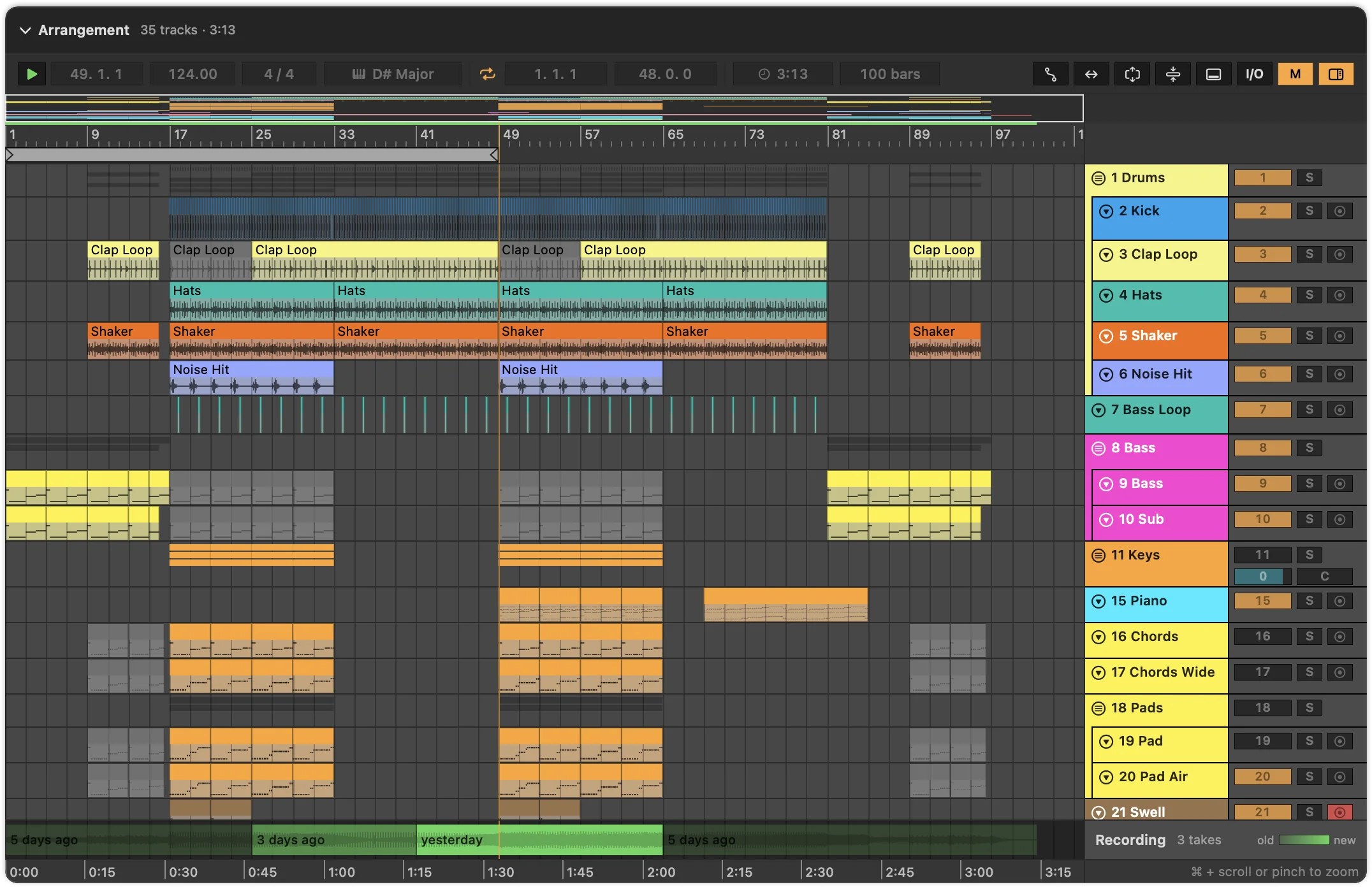
The app itself goes further: it searches all your sets by plugin, sample, tempo or key, lines up every save and backup of a project, and compares any two.
As text
An .als file is XML text, compressed with gzip. This writes a readable copy of it:
gzip -cd "My Song.als" > "My Song.xml"
Open the copy in a text editor. It’s long: one of the templates that come with Live 12 takes 213 KB as a set and 3.4 MB as XML. A few landmarks:
| Element | What it holds |
|---|---|
<Ableton> | The outermost element, with the Live version as Creator. |
<LiveSet> | The set. In it, <Tracks> has one <MidiTrack>, <AudioTrack>, <GroupTrack> or <ReturnTrack> for each track. <MainTrack> follows; older sets call it <MasterTrack>. |
<SampleRef> | A sample the set uses, with its Path on the disk and its RelativePath from the project folder. |
<Tempo> | The set’s tempo, as <Manual Value="124" />. |
If gzip answers “not in gzip format”, the file isn’t a Live Set as current versions of Live save them. A few other programs use the extension .als too.
Ableton doesn’t document the format, and it changes from version to version. Read the copy, and leave the set itself as Live saved it.
Because the names of tracks, plugins and samples are plain text in there, you can search all your sets for one of them: How to search all your Ableton projects.
Live’s other file types
A set is one of several kinds of file Live writes. The extensions, as Ableton lists them:
| Extension | What it is |
|---|---|
.als | Live Set, or a template set. |
.alp | Live Pack: one of Ableton’s Packs, or a project you packed into one file. |
.alc | Live Clip. |
.adg | Device group: a Rack preset. |
.adv | Device preset, of a single device. |
.agr | Groove. |
.asd | Sample analysis file, with what Live analyzed in an audio file. |
.amxd | Max for Live device. |
.ams | Meta sound: a waveform you made in Operator. |
.ask | Skin: a Live theme. |
.abl, .ablbundle | An Ableton Note Set, and a Note project with its samples. |
The same rule as for sets applies to all of them: a file from an earlier version of Live opens in a later one, but not the other way round.
Sources
Checked on 24 November 2026. The sizes and the XML elements were read from a template that comes with Live 12 Suite. If something here is out of date or wrong, please write to contact@als-preview.de.
- Ableton Help: Live specific file types, Backward Compatibility, Third party Set won’t open in Live Lite
- Ableton Live 12 manual: Managing Files and Sets
- Ableton: the free trial of Live