 Als Preview
Guides
How to search all your Ableton projects
Live opens one set at a time, and its browser finds sets by their names. So which of your projects used that plugin, that sample or that tempo? Here are four ways to search every Live Set you have, from what’s already on your Mac to Als Preview.
What finds what
| You remember | Live’s browser | Finder and Spotlight | Terminal | Als Preview |
|---|---|---|---|---|
| The set’s name | ✓ | ✓ | ✓ | ✓ |
| A track’s name | One set at a time | – | ✓ | ✓ |
| A plugin | – | – | ✓ | ✓ |
| A sample | – | – | ✓ | ✓ |
| Tempo or key | – | – | Needs a script | ✓ |
| How it looks and sounds | Open the set | – | – | ✓ |
Live’s browser
Add the folder with your projects to Places in Live’s browser, and its search finds your sets by file name. In Live 12 you can also tag sets and search for the tags. Unfold a set in the browser and it lists the set’s tracks, which you can drag into the set you have open.
That works well when you know which set you’re looking for. What Live’s manual doesn’t describe is a search inside all your sets at once: every project that uses a certain plugin or sample, or everything at 124 BPM.
Finder and Spotlight
Finder and Spotlight find a Live Set by its file name too, and Finder adds dates. In a Finder window press ⌘F, choose Name and ends with, and type .als. Then click the plus button and add Last modified date, to see only what you saved in the last month or year.
Neither looks inside a set. A Live Set is a compressed file, and macOS doesn’t read the tracks, plugins and samples in it. With Als Preview installed, Spotlight knows more: each project is listed with its tempo and key, and with its plugins and track names as keywords. See Spotlight.
Terminal: one line that looks inside every set
A Live Set is XML text, compressed with gzip, and the names of its tracks, plugins and samples are in it as plain text (more in What is an .als file?). macOS comes with zgrep, which searches compressed files. Open Terminal and type:
find ~/Music -name "*.als" -exec zgrep -l -i "serum" {} +
It prints every set under ~/Music that mentions Serum. Put your own projects folder in place of ~/Music, and part of a plugin’s, sample’s or track’s name in place of serum. -i ignores upper and lower case, and -l lists the files that match instead of the text that matched.
Live’s backups are sets too, so they show up as well. To leave them out:
find ~/Music -name "*.als" -not -path "*/Backup/*" -exec zgrep -l -i "serum" {} +
This costs nothing and needs nothing installed. Its limits:
- It matches text anywhere. A short word like
kickfinds every set with a sample, a track or a clip of that name, and you can’t ask for plugins only. - Every search unpacks every set. Even a small set is a few megabytes of XML, so a big library takes a while, each time.
- Tempo and key aren’t names. Finding everything between 120 and 128 BPM means reading the XML with a script.
- You get a list of files. To know whether one is the right set, you still open it in Live.
Some open-source tools go further and keep an index that you search from the command line. They are listed with the other Ableton project managers.
Als Preview
Als Preview is a Mac app that reads every set in the folders you choose, Live’s backups included, and keeps that library up to date as you save. Thousands of sets narrow down in a fraction of a second, without opening a single one.
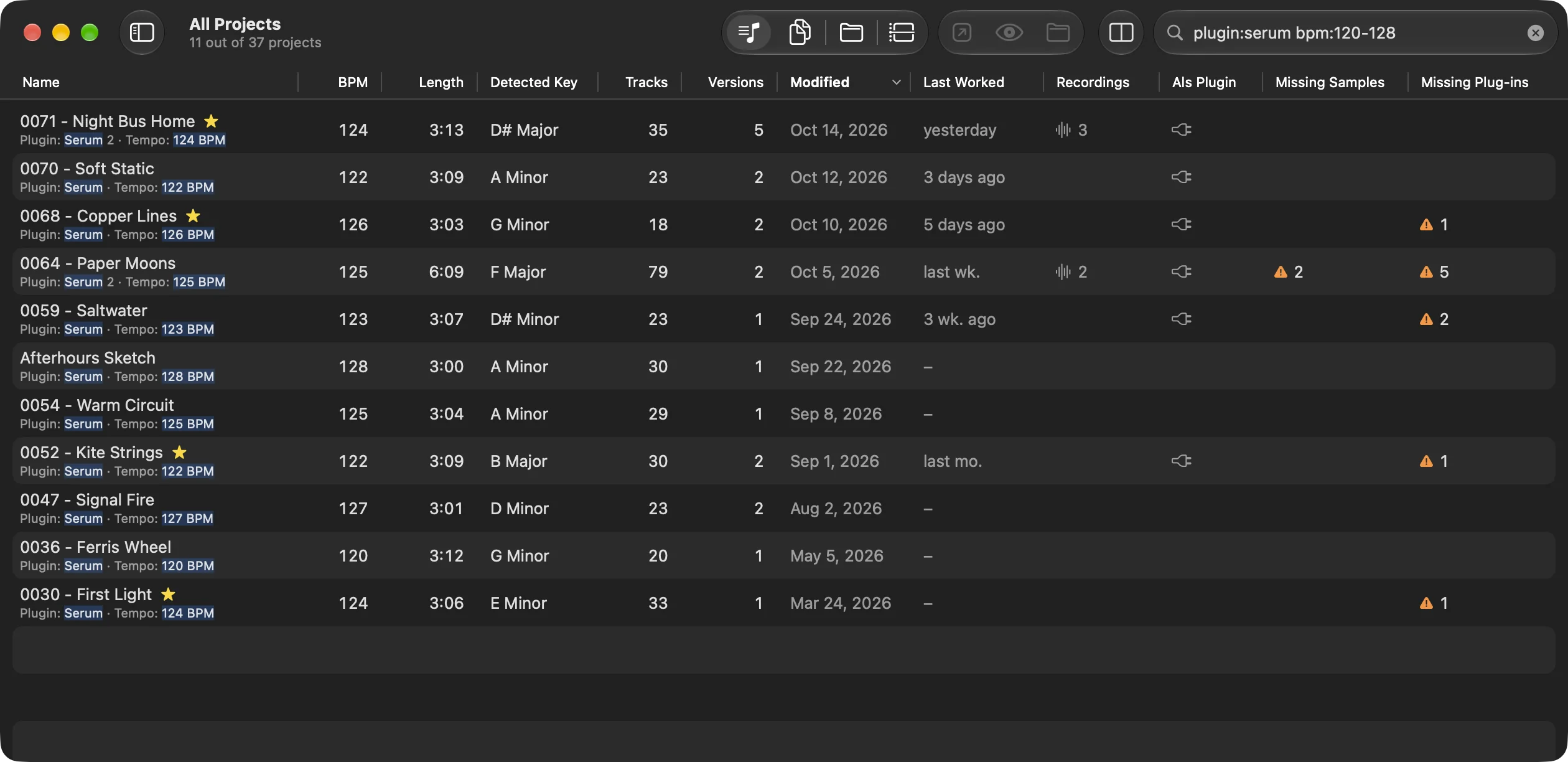
plugin:serum bpm:120-128 finds the projects that use Serum at 120 to 128 BPM. Under each name it says what matched.- Type what you remember. Words are looked for in the names of your projects and sets, and of all their tracks, plugins and samples.
- Narrow it down with filters:
plugin:serum,sample:kick,track:vocal,bpm:120-128,key:"A Minor",live:11,status:mixing,modified:30d. Combine them withor, a minus and parentheses. - See why it matched. The line under each result names the track, plugin or sample that was found.
- Check without opening Live. Select a result to see its arrangement and play it.
- Keep a search. Save it as a view in the sidebar, and it always shows what matches now.
Every filter and how to combine them: Search and filters. Als Preview runs on macOS 15 or later, reads sets saved with Live 10, 11 and 12, and is free to try for 14 days. Set up Als Preview
Searches worth knowing
| Question | Search in Als Preview |
|---|---|
| Which projects use a plugin I want to uninstall? | plugin:kontakt |
| Where did I use that vocal chop? | sample:"vox chop" |
| Which projects were saved with Live 11? | live:11 |
| Which projects miss samples or plug-ins? | is:missing |
| What’s in A minor and not finished yet? | key:am -status:finished |
| Which techno or house ideas haven’t I touched for a year? | (techno or house) status:idea modified:>1y |
In the Projects view, a plugin or sample is looked for in all sets of a project, so plugin:kontakt also finds a project whose old version used it. Switch to Sets to see exactly which saves do. See Projects or sets.